

Guide#
The guide shows how to build an enzyme-constrained model (ecModel) from a conventional genome-scale metabolic model (GEM) with GECKO (MATLAB) or geckopy (Python), and how to analyse it. Build an ecModel makes a working ecModel with the default settings. Each step of that page links to a decision page, which describes the options of the step, what each option needs and what it changes in the model. The background pages describe the file formats and the parameters.
GECKO 4 pre-release
GECKO 4 is a pre-release, and the guide describes GECKO 4. For GECKO 3 users, GECKO 3 to GECKO 4 lists the changes.
MATLAB and Python
Task pages show both languages in tabs: GECKO (MATLAB), built on RAVEN, and geckopy (Python), built on cobrapy. Function names differ in case (camelCase and snake_case), and some differ in the word as well; MATLAB vs Python lists the name of each function in both languages, and the API reference lists the signatures.
Text outside a MATLAB or Python tab reads the same in both languages. Where it refers to the enzyme data of a model, ec.kcat stands for ecModel.ec.kcat in MATLAB and ec_model.ec.kcat in Python. The field names are identical in both languages except rxnEnzMat (Python: rxn_enz_mat) and ec.geckoLight (Python: gecko_light).
Start#
Introduction to ecModels: what an ecModel is, the enzyme constraint and the protein pool.
Installation: install GECKO or geckopy.
Quick path#
Build an ecModel: create a project, make the ecModel, assign kcats, set the protein pool, check the growth rate and save the model, with the default settings.
Workflow#
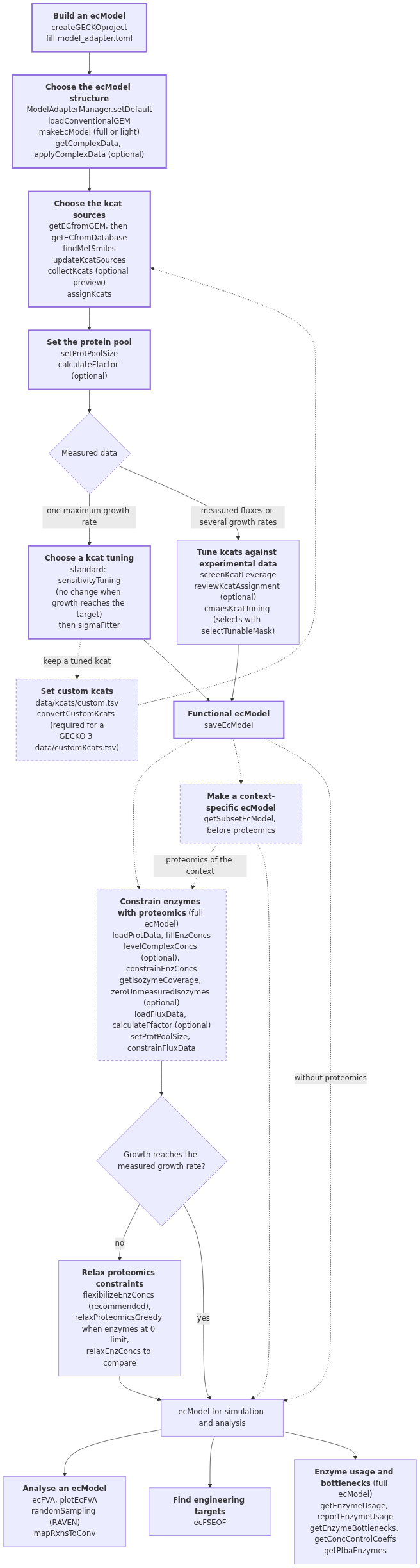
The workflow overview shows the order of the pages below, the steps of the quick path, the alternative paths and the functions of each page, in MATLAB and Python.
Decisions#
The decision pages are in the order of the work.
Page |
Choice |
|---|---|
full or light ecModel, matching of genes to UniProt and KEGG, enzyme complexes |
|
the kcat assignment preset, and the treatment of isozymes and of reactions without a kcat |
|
curated kcats that take precedence over the kcat sources |
|
the values of the total protein content, the enzyme fraction \(f\) and the saturation factor \(\sigma\) |
|
standard or advanced kcat tuning, when the ecModel grows too slowly |
|
the data and the settings of the advanced kcat tuning |
|
the integration of measured enzyme concentrations |
|
the method that loosens proteomics constraints that prevent growth |
|
objectives, flux variability, sampling and the mapping of fluxes to the conventional GEM |
|
the reactions and genes to change for the production of a compound |
|
an ecModel of a tissue, cell line or strain, trimmed from a generic ecModel |
|
which enzymes a solution uses and which enzymes limit the objective |
Background#
ecModel YAML format: the file format that both toolboxes read and write.
Files in the data folder: the files that the
datafolder of a project can hold.Model adapter parameters: every parameter of
model_adapter.tomlin both languages.Basic model operations: bounds, objectives, flux balance analysis, flux inspection and export, for conventional GEMs and ecModels.
Migration#
GECKO 3 to GECKO 4: the changes of results, errors, functions and names.
Project format 4: the project folder,
model_adapter.toml, the kcat source files and the ecModel format.Upgrade a GECKO 3 project: the steps of
upgradeGECKOprojectandupgradeEcModel.Kcat assignment: the kcat sources, stages and presets of
collectKcatsandassignKcats.
See also#
API reference: the generated documentation of the functions of both toolboxes.
MATLAB vs Python: the names of the functions in GECKO and geckopy.